

Using ChatGPT, and never quite sure the answer is right?
AI Launchpad: an AI course for beginners. Use ChatGPT, Claude, Gemini and Copilot safely and well, and build a working AI workflow, in 2 weeks, live.
For anyone at any desk, with zero code: how these assistants work, in plain words, how to check what they tell you, and one workflow you keep, with placement support and a certificate an employer can verify.
Taught live by industry experts from Mastercard and Paytm.
★ 4.7 from our pilot batch · 4,200+ learners trained by SkilD · learners at 39+ companies
Free · 90 minutes, live with our faculty · next date announced soon

Thirty people learning the same tools together, with one chat for questions.
ChatGPT, Claude, Gemini and Copilot, on the same task.
Resume, portfolio review, mock interview, job alerts and introductions.
Named after your project, so an employer sees the work.
AI skills and salary: a 30–40% hike on a job switch for scarce skills.
Most desks now have an AI assistant. The people who use one well, and can check what it says, are the ones companies pay more for.
- 30–40%Hike on a job switch for scarce skills, against a 9.1% average
- 25–45%Salary increase within a year, for people who move into AI roles
- ₹25 LPAAverage base pay, AI Product Manager
Michael Page India Salary Guide 2026 (9.1% is the average hike) · TeamLease Digital, 2025 · Glassdoor India, AI Product Manager, 2026.
Who AI Launchpad is for: an AI course for beginners, at any desk.
People who have tried an AI assistant, or not yet, and want to use one well at work, starting this month.
A student or fresher→ AI on your resume, used well
You leave with four assistants used side by side, a habit of checking every answer, and a workflow to show in any interview.
A working professional→ Faster, checked work
Drafts, research and spreadsheet answers in minutes, each one checked against its source before anyone else sees it.
A manager or team lead→ The person the team asks
How these tools work, where they go wrong and what stays out of them, so the team’s questions get a clear answer.
Before a PG Program→ A tested first step
Two weeks to find out how you learn with us, with a working AI workflow in hand either way.
- Zero code, at any point
- Your weekend mornings for two weeks, live
- A laptop and a browser; free accounts on the assistants, opened with the helpline
- English you can follow in a live class
Go further with a PG Program.
Data Engineering, AI Engineer and AI Generalist each take you to a new role, live, with placement support through to offer. You arrive with the assistants already in hand.
Eight AI tools, free to start, and the four big assistants on the same task.
Every account is opened with the helpline before the first live session. Week 1 runs one task in all four assistants, so you see where each one is strongest.
ChatGPT
Writing, analysis and files · custom instructions · voice
Best at:drafts and rewrites in a set tone, and questions put to an uploaded file
Claude
Long documents and careful writing · projects that keep context
Best at:reading a long report and answering from it, with the page it came from
Gemini
Google’s assistant · Gmail, Docs and Sheets · research mode
Best at:staying inside the Google tools a team already uses
Microsoft Copilot
Microsoft’s assistant · Word, Excel and Outlook · web answers with links
Best at:staying inside the Microsoft tools most offices run on
Your workflow in week 2 is built with whichever assistant fits the task best.
- Nothing to buy. Any laptop from the last five years, and a browser
- Free accounts on ChatGPT, Claude, Gemini and Copilot, opened with the helpline
- A Google or Microsoft account for Sheets or Excel
- NotebookLM and Perplexity on their free tiers
Stuck on setup? WhatsApp the helpline and someone walks through it with you. The prompts and the workflow you build are yours to keep.
Ask it. Check it. Use it.
The full AI Launchpad syllabus: two weeks, two parts, and a working AI workflow at the end.
How AI works, and the assistantsweek 1 · 6 hrsYou leave able toGet a usable answer from four assistants, and check it before you use it.
- W1LLM foundations and the major AI assistantsLarge language model fundamentals: tokens, context windows and hallucination · ChatGPT, Claude, Gemini and Copilot compared · prompt engineering: role, context, few-shot examples and output format · output verification, and AI data security: confidential data, PII and acceptable-use policyBuild: the same task in four assistants, compared6 hrs
Research, spreadsheets and a first workflowweek 2 · 6 hrsYou leave able toResearch with sources, question a spreadsheet, and run one workflow end to end.
- W2AI-assisted research, spreadsheet analysis and a first workflowResearch with citations in NotebookLM and Perplexity · AI in spreadsheets: formula generation and data analysis · image and video generation (demonstration) · an AI workflow, built liveBuild: a working AI workflow with a verification log6 hrs
One Workflow, Checked · AI Launchpad
One task from your week run through an AI workflow, with a verification log beside it, and resume lines to explain in any interview.
The detailed AI Launchpad syllabus and the timetable, in one PDF.
- Every topic, week by week
- The timetable, with dates
- All eight tools, and what each is best at
- The setup guide for week one
Download it now. The helpline is on WhatsApp if a question comes up.
Your syllabus is ready.
Questions? The helpline answers on WhatsApp.
Learn the assistants from people who use them at work every day.
They answer in the cohort chat between sessions, and review the work you hand in.




Get your two-week plan, mapped onto your own work.
Leave your number and a program advisor calls within one working day with a plan built around your work: the assistant to start with, and the task worth taking into your workflow. Or WhatsApp the helpline now.
Your plan is on its way.
A program advisor calls within one working day to walk through it.
Three things that make two weeks work.
Hands-on, from week one
Every week ends in something used on your own work, reviewed by the faculty.
The four big assistants
ChatGPT, Claude, Gemini and Copilot side by side, with four more tools, free to start.
Built around a full-time job
Weekend mornings, and every class recorded and up within 24 hours.
Two weekends, and the help around them.
Everyone moves through the same week on the same deadline, with the same thirty people.
- 01The brief, firstWhat you’ll try this week, and what done looks like. Before the session, not after.
- 02Try it with the facultyOn screen with the faculty, chat open, your question answered on the call.
- 03Use it at workStarted in the session, finished by the deadline, on a task from your own week.
- 04Reviewed, every weekYour work checked by the expert who set it, so you know where you stand.
- 05Bring what brokeAsk in the cohort chat, or bring it to the next session.
One project you can show: One Workflow, Checked, a working AI workflow with its verification log.
It runs on a task from your own week, and it is finished when the workflow runs and every figure in its output is traced to a source.
One Workflow, Checked: a task from your week, run through AI, with the checks written down.
You pick a task you do every week, run it through the assistant that suits it, then check the output line by line: figures against their source, dates against the original, names against the record. The verification log shows what the assistant got right, what it got wrong and how you caught it.
- How it works
- In week 1 you compare four assistants on one task and learn where answers go wrong. In week 2 you add research with sources and a spreadsheet step, then build the workflow live.
- Where it is used
- The same shape drafts a weekly report, summarises supplier emails into a table, answers a question from a policy document and turns a messy export into a clean summary.
- What it proves
- That you can put AI to work on a task and stand behind the result, because every figure was checked.
- What it does
- Turns a week of supplier emails into one summary table.
- Tech stack
- ChatGPTClaudePerplexityGoogle Sheets
- Key challenge
- Hallucination: a misread ₹48,200, corrected to ₹42,800 from the invoice.

Three builds on the way
Each one becomes a piece of One Workflow, Checked.
Four Assistants, One Task
The same task given to ChatGPT, Claude, Gemini and Copilot, with each answer checked and the strongest one picked for a reason you can explain.
Done when: each answer is checked and the pick has a written reason.
Proves the ability to choose the right assistant for a task.
A Research Brief With Sources
One page on a question from your work, built in NotebookLM and Perplexity, with every claim linked to the source it came from.
Done when: every claim opens to its source.
Proves the ability to research with AI and show where each fact came from.
Spreadsheet Answers, Checked
A plain-English question answered from a working sheet with AI, and every figure recalculated once by hand.
Done when: the AI answer and your recalculation agree.
Proves the ability to trust an AI’s number, because you checked it.
The faculty who teach it review every project.
Placement support: five steps from the course to a role that asks for AI.
One Workflow, Checked is the raw material. These five steps put it in front of hiring teams, for a first role or a bigger one where you work now.
- 1Week 2Your resume and LinkedInRewritten around One Workflow, Checked and reviewed line by line.
- 2Week 2Your portfolio reviewThe workflow and its log checked against what a hiring manager opens first.
- 3After week 2A mock interviewA round with an industry expert: the workflow walked through and one task run live, recorded and reviewed.
- 4From week 2Job alertsOpenings that ask for AI skills, on WhatsApp, as they open.
- 5From week 2IntroductionsTo hiring teams in the SkilD network, as roles open.
Check your resume against these roles first → · Going further? See the PG Programs →
Our learners work at 39+ companies.
Where people who learned with SkilD work now.


 amazon
 Swiggy
 Twitter
 ByteDance
 PayPal


 Flipkart


 ATLASSIAN
Training a team? 12+ organizations bring us in to train their own people, on their own work. Plan a program for your team →
Every desk has an AI assistant now. The trust goes to the people who check it.
The assistants are free. Knowing when they are wrong is scarce.
Most people now use ChatGPT, Gemini or Copilot for a first draft. The ones who get trusted with more are the ones who pick the right tool, check what it says and keep private data out of it. These two weeks build that habit.
From a first prompt to work they stand behind.

I used ChatGPT for months without checking anything. The verification log changed that, and my manager now sends me the reports that matter.

Week one put four assistants side by side on my own task. I stopped guessing which one to use.

I wanted to see how I learn live before a long program. Two weeks answered that, and I joined AI Generalist.
One AI Launchpad certificate an employer can verify by its ID.
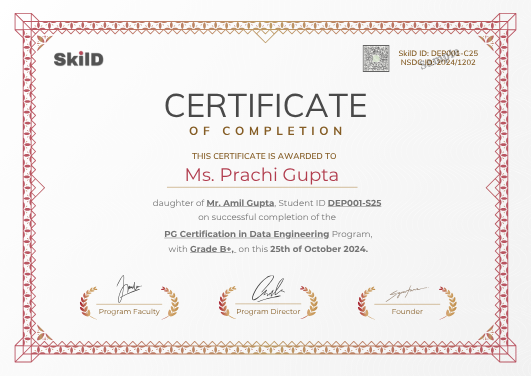
Awarded when your project is complete and every build passes its review, with a verification ID anyone can check.
Awarded by SkilD on completion, and checked at skild.co.in/verify. It names One Workflow, Checked, so an employer sees the work itself, with the ID to prove it.
One fee for the AI Launchpad course, everything included.
- Both weeks, taught live
- One Workflow, Checked and three builds on the way
- Placement support
- Every session recorded
- The weekday doubt channel and the Saturday doubt clinic
- The certificate
Training a whole team? Plan it with us →
Why two weeks, live?
Plenty of ways to learn ChatGPT. Here is what each one usually gets you.
| The route | What it usually gets you | What 2 weeks here gets you |
|---|---|---|
| YouTube and free courses | Prompt tips, one tool at a time, and nobody to ask when the answer is wrong. | Four assistants on the same task, and the faculty answering in the session. |
| A recorded course | Videos you mean to finish. | A live session every weekend, a deadline that keeps you moving, and placement support after. |
| A one-day workshop | A burst of ideas, and the same habits on Monday. | Two weekends, each one put to work on your own task the week after. |
From enrolment to your first weekend.
- 1EnrolTwo short steps on this page
- 2Pay onceYour seat is held for this cohort
- 3Join the cohort groupOn WhatsApp, with your batch
- 4Setup callWith the helpline, before day one
- 5First live sessionOnline, with your faculty
10 AM to 1 PM IST. Bring one task from your week to work on.
Seat confirmed. Welcome to the November cohort.10:02
- ✓ChatGPT
- ✓Claude
- ✓Gemini
- ✓NotebookLM
The joining link for Saturday is pinned above.Fri 6:00 PM
- One price, everything includedevery live session and its replay, every project review, and placement support.
- Live means livea room of thirty, every question answered in the session.
- Dates that holdplan your months around us.
- A mentor who knows your namefirst reply within one working day.
- Miss a weekwatch the recording, then bring your questions to the Saturday doubt clinic.
- Everything you build is yourscode, projects, portfolio. For good.
Enrol in AI Launchpad.
Two short steps, then payment. About three minutes.
Details saved.
One more short step, then payment.
You are enrolled.
Your confirmation and the cohort WhatsApp link arrive within minutes. The helpline sets you up before day one.
AI Launchpad course: your questions, answered.
Do I need coding for the AI Launchpad course?
Zero code, at any point. A browser and free accounts on the assistants are all it needs, and the helpline opens every account with you before the first session.
What will I be able to do after AI Launchpad?
Use ChatGPT, Claude, Gemini and Copilot side by side and pick the right one for a task, explain how they work in plain words, check an answer against its source, research with citations, question a spreadsheet, and run one AI workflow with a verification log.
Which AI tools does the AI Launchpad course teach?
ChatGPT, Claude, Gemini and Microsoft Copilot; NotebookLM and Perplexity for research; AI inside Google Sheets and Excel; and an image and a video generator, shown. Eight tools, each on a free tier to start.
How does the AI Launchpad course teach me to check ChatGPT’s answers?
You check it the way week 1 teaches: figures against their source, dates and names against the original, and a second assistant for a second opinion. The verification log in your project records every check.
What does AI Launchpad teach about keeping data safe in AI tools?
Keep out customer data, passwords, unreleased numbers and anything your employer marks confidential. Week 1 covers it on one page, with the employer’s AI policy and how to find it.
Who can enrol in AI Launchpad?
Anyone who can follow a live class in English: students, freshers, working professionals in any function, and people coming back after a break.
Is AI Launchpad an AI course for beginners?
Yes. It starts from how these assistants work, in plain words, and ends with a workflow you built yourself.
Can I talk to someone before I enrol in AI Launchpad?
Yes. WhatsApp the helpline, or ask for a call back and a program advisor calls you with your two-week plan.
How much time does the AI Launchpad course take?
Two weekends, Saturday and Sunday mornings, plus a little practice on your own work.
What are the AI Launchpad course fees?
One fee, GST included, paid once at enrolment. It covers both weeks taught live, the project and three builds, placement support and the certificate.
What if I miss an AI Launchpad session?
Every class is recorded and up within 24 hours. Watch it, then bring your questions to the Saturday doubt clinic.
Do I get an AI Launchpad certificate?
Yes, with a verification ID an employer can check. It is awarded when your workflow runs and every build passes its review.
Is there placement support after AI Launchpad?
Yes, in five steps: your resume and LinkedIn, a portfolio review, a mock interview, job alerts and introductions to hiring teams in the SkilD network, as roles open.
What comes after AI Launchpad?
A PG Program, if you want the whole road to a new role: Data Engineering, AI Engineer or AI Generalist. You arrive with the assistants already in hand.
Two weekends from now, you could be the one the team asks about AI.
Four assistants used well, a workflow you can stand behind, and placement support to put it in front of hiring teams.
Want to look first? Download the syllabus or get a call back.
Data and AI openings on WhatsApp, and the hiring market twice a month.
The roles the companies our learners work at are hiring for. Read three issues of the Brief and you’ll know whether we’re your kind of school.
You’re on the list.
The first alert lands the next time our network is hiring, and the next Brief lands in your email.