

Use ChatGPT every day? Make it do the work, not just the drafts.
Become the AI lead in your function in 22 weeks: automate the work, read the numbers and build the tools, with no coding, live on weekends.
An AI course for working professionals who stay in their function: managers, marketers, sales, operations, HR and finance. Weekends, live, with recordings.
Taught live by practitioners from Mastercard and Paytm.
Download the syllabusBook a 1-on-1 call with a program advisor
Every weekend live, every class recorded and up within 24 hours.
An end-to-end project, two project weekends, and ten more along the way.
Managers, marketing and sales, operations, or HR and finance.
Every tool here works without writing a single one.
AI skills and pay: 25–45% increases within a year of moving into AI.
Every team now has AI tools. The people who can put them to work are scarce, and companies pay for scarce skills.
- 25–45%Salary increase within a year, for people who move into AI roles
- 30–40%Hike on a job switch for scarce skills, against a 9.1% average
- ₹25 LPAAverage base pay, AI Product Manager
TeamLease Digital, 2025 · Michael Page India Salary Guide 2026 (9.1% is the average hike) · Glassdoor India, AI Product Manager, 2026.
Who this AI course for working professionals is for.
People who stay in their function, and want to be the one in it who leads AI.
Managers, product and project leads→ The AI lead for your team
The plan and the people are already yours. This program adds the workflows, the numbers and the case to take AI across the team.
Marketing, content and sales→ More output, same quality floor
Here, the content system and the sales cycle run on AI, with the results measured.
Operations and admin→ Work that runs itself
The same forms, invoices and handoffs every day, moved through automations and agents, with an approval step where it matters.
HR and finance→ Numbers that explain themselves
Reports, reconciliations and reviews on a monthly clock. Here, the dashboard refreshes itself and every number AI touches gets checked.
- A bachelor's degree in any stream
- Weekends: six hours live, Sat and Sun 10 AM–1 PM, plus 4–5 hours of practice recommended
- A laptop, and free accounts on the assistants, set up in a live session before week 1; free tiers and trials cover the program
- No coding, at any point: a clear email and a spreadsheet are all it assumes
AI at Work: an eight-week head start.
The first eight weeks of this program, sold on their own: the assistants made into a system, a team knowledge base, the numbers, and where AI moves one, ending in Five Hours Back. The certificate ID carries into this program.
Build for your own job for 22 weeks, then three weeks in the lab for your function.
The core is the same for everyone: assistants, research, numbers, content, automation, prediction, agents and apps. The function lab is weeks 17 to 19, on the work your function is judged on, with the tools it already uses. Choose your function before week 17.
Managers, Product & Project Leads
Copilot in Teams and Outlook · Jira / Asana AI · Gamma · NotebookLM · Claude · Lovable · a survey tool
Prepares forAI Product Manager · AI Project Manager · AI Transformation Lead
You build:The Team Playbook, an AI operating plan for a team, three workflows live and measured
Marketing, Content & Sales
Claude · ChatGPT · Canva AI · an image and a video generator · Perplexity · GA4 exports · a CRM with AI · WhatsApp Business
Prepares forGrowth Marketer (AI) · AI Content Strategist · Sales Enablement / RevOps Lead
You build:The Campaign Engine, one campaign from brief to assets to launch to a measured result
Operations
n8n · webhooks · data tables · document AI / OCR · Airtable · Google Sheets
Prepares forAI Automation Specialist · Business Process Automation Lead · AI Operations Lead
You build:The Back Office That Runs Itself, an order-to-invoice or ticket-to-resolution flow that runs for two weeks, with its error log
HR Analytics & Finance
Excel / Google Sheets with AI · Excel with Copilot · Claude · Looker Studio · document AI
Prepares forHR Analytics / People Analytics Specialist · HR Business Partner (AI) · FP&A Analyst (AI)
You build:The People and Money Dashboard, an attrition-risk report or a monthly MIS that refreshes itself, with a narrative a leader reads
Weeks 20 to 22 bring every function back together: one business case, presented live at Demo Day.
Map it. Build it. Check it. Lead it.
The full applied AI syllabus: 22 weeks in four phases, two project weekends, and the job title each block opens. Every project lands on the work of your own function. Open any phase for what gets built and the tools used.
Working with AIweeks 1–8 · 8 weeks
- W1–2AI Launchpad: how AI works, and the assistantsHow LLMs work, without the maths · ChatGPT, Claude, Gemini and Copilot, and how to prompt them · checking the answer · NotebookLM and Perplexity · a first AI workflow2 wks
- W3Your assistants, made into a systemProjects and custom instructions · a prompt library · Gemini in Google Workspace · Microsoft 365 Copilot and meeting notes, shown1 wk
- W4Your team's knowledge baseYour documents as the AI’s memory · building and testing the knowledge base · a weekly market watch · train a tiny model, with no code1 wk
- W5–6Numbers and the storyExcel and Sheets with AI · checking the AI’s arithmetic · Power BI and Looker Studio · what-if scenarios · decks with AI2 wks
- W7Where AI moves the numberProcess mapping · time and cost baselines · build or buy · an opportunity brief with an ROI estimate1 wk
- W8Project weekend 1 · Five Hours BackOne process, its baseline and its AI plan, built live and graded1 wk
Building without codeweeks 9–16 · 8 weeksOpensAI Content Strategist · AI Automation Specialist
- W9Content, image, video and voiceBrand voice as instructions · one asset into five formats · image and video generation · AI voice, with consentAI Content Strategist1 wk
- W10Work that runs itselfTriggers, actions and branches in n8n · data mapping · errors and retries · Zapier, Make and Power Automate, shownAI Automation Specialist1 wk
- W11AI that predicts, without codeTraining, testing and overfitting · forecast, classify and segment in KNIME · when machine learning beats rules1 wk
- W12–13Agents without codeThe n8n AI agent node · approval gates · Custom GPTs and Gemini Gems · a customer-support agent · a voice agent for calls or WhatsApp2 wks
- W14Project weekend 2 · The First Week UnattendedThe automation and agent switched on in week 13, graded on their one-week log1 wk
- W15–16Agentic AI systems and team appsPlan, approve, execute · multi-agent teams and MCP · testing an agent with an AI judge · guardrails and cost · a team app built with Lovable and Airtable2 wks
Your function labweeks 17–19 · 3 weeksOpensAI Project Manager · AI Product Manager · Growth Marketer (AI) · Sales Enablement / RevOps Lead · AI Operations Lead · HR Analytics Specialist · HR Business Partner (AI) · FP&A Analyst (AI)
- W17Choose and measurePicking the use case · a clinic for your function · a KPI dashboard1 wk
- W18Plan the changeMapping the process · a clinic for your function · a process map and an ICE-scored roadmap1 wk
- W19De-risk and shipRisks and rollout · a clinic for your function · a risk heatmap and a sprint plan · your end-to-end project goes liveAI Project Manager · AI Product Manager · Growth Marketer (AI) · AI Operations Lead · HR Analytics Specialist · FP&A Analyst (AI)1 wk
Leading AI & end-to-end projectweeks 20–22 · 3 weeksOpensAI Transformation Lead · AI Consultant (internal)
- W20Governance and changeDPDP, vendor and data terms · a usage policy and shadow AI · pilot to scale, with ROI and kill criteria · leading the changeAI Transformation Lead · AI Consultant (internal)1 wk
- W21Build, and the next roleBuild with mentors · the portfolio and the internal pitch · AI-role interviews1 wk
- W22Demo Day · The Adoption FileOne real process: the week 8 baseline as before, a live run from week 19, the after measured, presented before a panel1 wk
The end-to-end project · PG Program · AI Generalist & Agentic AI (No-Code)
The Adoption File · a measured before and after · presented live at Demo Day
The detailed curriculum, the week-by-week timetable, every tool and function, and the faculty, in one file.
- Every week and every topic
- The timetable, with dates
- Every tool, by phase and by function
- The faculty who teach it
Download it now. A program advisor calls within one working day to walk through it and answer anything it leaves open.
Your syllabus is ready.
A program advisor calls within one working day to walk through it.
Taught live by people who run data and AI systems for a living.
Taught live on weekends, with doubts answered in the weekday channel and the Saturday doubt clinic.




Try a free live build, and meet the faculty before you apply.
Ninety minutes, live and free. A SkilD faculty member builds a working AI workflow from an empty screen, with no code, while the room builds alongside, chat open. It's the clearest way to see how a session here works. Next sessions: Sat, 17 Oct 2026 or Sat, 24 Oct 2026, 11:00 IST.
Your seat is saved.
The joining link reaches you on WhatsApp, with a reminder on the day.
Three things that make twenty-two weeks work.
Hands-on, from week one
Every block ends in something built on your own work, reviewed by the faculty, and two project weekends to finish and catch up.
The tools companies already pay for
ChatGPT, Claude, Gemini, Copilot, n8n, KNIME, Lovable and more, with no code at any point, and a lab for each function.
Built around a full-time job
Live on weekends, every class recorded and up within 24 hours.
What a week looks like.
Everyone moves through the same week on the same deadline, so a bad week costs you a replay, not the cohort.
- 01The brief, firstWhat you'll build this week, and what done looks like. Before the session, not after.
- 02Build it liveOn screen with the industry expert teaching it, chat open, your question answered on the call.
- 03Finish itStarted in the room, finished by the deadline, on the process you brought.
- 04Feedback, weeklyFrom the faculty every week. Marks come only when a test or project is due.
- 05Bring what brokeThe Saturday doubt clinic, 3–4 PM, and a weekday doubt channel, for the flow that won't run.
- 06It carries forwardEvery block hands its work to the next. Nothing built is thrown away.
An AI course with projects from your own job: one business case, and the twelve projects that build up to it.
Each runs on work from your own job, or a supplied case business, and each is finished when it does the job it would do in a team. A manager can open it and use it.
The Adoption File, presented live to a panel.
One process from your own organization, measured before and after, with the built system, playbook and governance sheet, presented to a panel as a business case.
- How it works
- Week 7 maps the process and week 8 measures it. From week 14 your automations run unattended. From week 19 the chosen process runs live, and by week 22 it has its after, a monthly cost and a policy a finance director would sign.
- Where it is used
- The same shape takes an AI assistant into sales, screening support into HR, the month-end pack into finance, and content at scale into marketing.
- What it proves
- That you can find where AI moves a number, build it without code, measure it and lead its rollout. Every piece of it can be opened in a review.
Projects along the way
Two project weekends and the builds between them, on your own work. Everything leads into the end-to-end project:
The Monday Numbers
A weekly report that builds itself from raw data, checked, charted and presented to the room.
Proves you can turn a messy sheet into a number the room trusts.
→Five Hours Back
One process from your own work, timed and costed as it runs today, with the AI plan that wins the hours back.
Proves you can find where AI moves a number, before anyone builds.
→A Prediction, Without Code
A churn or demand prediction for your own function, built in KNIME, with a note on when to trust it and when rules do better.
Proves you can use machine learning without code, and know when it is wrong.
→The Customer Support Agent
An agent that reads, classifies and answers support queries, with an approval gate before anything irreversible, switched on to run for a week.
Proves an agent can decide while a person stays in charge.
→The First Week Unattended
The automation and the agent from week 13, graded on their one-week log: what ran, what failed, and what a person approved.
Proves a repeat task can be handed to a machine, with an alert the moment it fails.
→The Team Tool
A working internal tool on a live link, with logins and access set for the team that uses it.
Proves you can build the tool a team has waited months for, and know its ceiling.
→Your Function Project
One use case in your own function: the Team Playbook, the Campaign Engine, the Back Office That Runs Itself, or the People and Money Dashboard, with its KPI dashboard, roadmap and sprint plan.
Proves you can run AI across a team, not only at one desk.
→The Rollout Plan
A usage policy, vendor and data terms checked under DPDP, and a pilot-to-scale plan with its ROI and kill criteria.
Proves you can put AI into a team with the controls intact.
→Every project is reviewed by the faculty who teach it.
Six lines every AI-ready manager's profile needs. Yours will have all six.
Operations Manager · leads AI adoption for the function
Projects
- The Adoption File one process measured before and after, presented to a panel as a business case
- The Customer Support Agent queries classified, answered and logged, with an approval gate
- The First Week Unattended an automation that ran seven days without a touch
AI skills
- Opportunity finding processes mapped, leverage ranked, briefs a manager reads
- AI assistants a documented system on ChatGPT, Claude, Gemini and Copilot
- Evidence and analysis sourced research, checked numbers, charts that hold up
- No-code building workflows, agents and internal tools, with no code
- Judgement verification protocols, cost per run, the tasks kept human
- Governed adoption DPDP-aware policy, vendor review, a signed rollout plan
See what your profile is missing for an AI-ready role.
Three fields open it. Then upload a resume or LinkedIn profile, or answer four questions. Your skill report arrives within 10 minutes: the lines already there, the ones this program adds, and the closest title today.
Your analysis is on its way.
A program advisor calls within one working day to walk through it.
Career support: five steps to moving up or across with AI.
The profile is the raw material. From week 20 to the next move, whether internal, a promotion or a new job, this is the work done on it, step by step.
- 1Week 20The case, writtenA rollout plan for your organization, with pilot, measures and kill criteria, plus a LinkedIn profile and the one-page summary a leader reads first.
- 2End-to-end projectThe panelThe Adoption File, presented as a business case to people who have hired for these roles, with their notes added to the file.
- 33+ roundsThe mock interviewsJob interviews, promotion conversations and internal pitches, practised with people who have hired for these roles. Recorded, with feedback, and repeated until ready.
- 43+ reviewsThe portfolio reviewEvery project checked against what a hiring manager or a leadership team opens first, before it goes out.
- 53+ introductionsThe introductionsWarm introductions into the 39+ companies our learners work at, a job board of the AI roles they're hiring for, and support that continues [support window to come].
Our learners work at 39+ companies.
The introductions in step five go into this network.


 amazon
 Swiggy
 Twitter
 ByteDance
 PayPal


 Flipkart


 ATLASSIAN
Training a team? 12+ organizations bring us in to train their own people, on their own processes. Plan a program for your team →
AI won't take your job. Someone in your function who uses it well might.
The tools are everywhere. The people who lead them are scarce.
Most teams already have ChatGPT, Copilot or Gemini, and use them for drafts. The fastest-moving companies want someone in each function who can find where AI moves a number, build it without code and lead the rollout. This program builds that person.
From where they were to where they are.
The agent weeks changed my Mondays. My support agent sorts every vendor query before I log in, and I only approve what it flags.
I'd used ChatGPT for two years and never measured it once. The Adoption File put a number on a process my team had lived with, and that number carried my promotion case.
I came in wary of anything technical. My function project’s dashboard now refreshes itself every month, and the people review starts from it, not from a week of spreadsheets.
Two applied AI certificates an employer can verify in ten seconds.
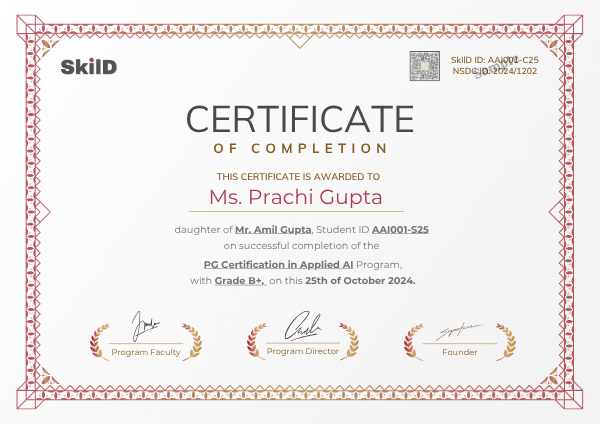
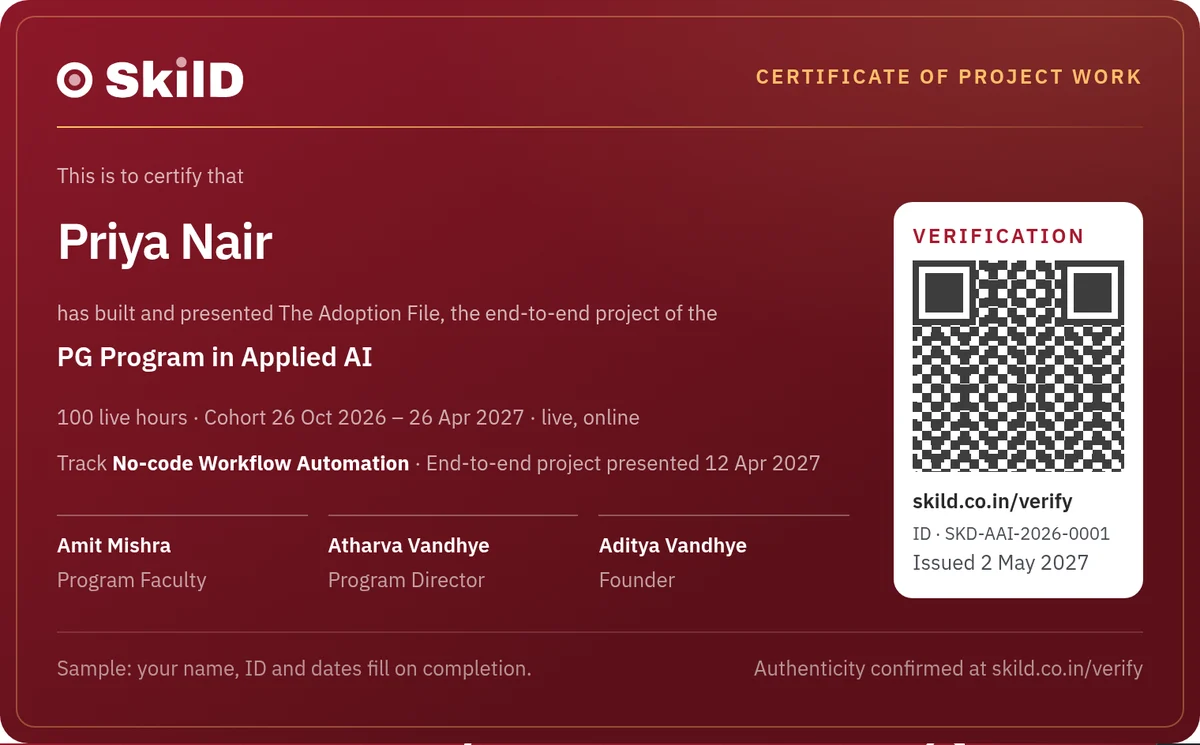
Two certificates for shipped work, not attendance, each with a verification ID an employer can check.
Awarded by SkilD on completion. What each certifies, and the bar that earns it, is stated in full on enrolment. Both name your function and every project built.
One fee for the applied AI program, everything included.
₹74,000 for all 22 weeks, GST included. EMI options come with the application.
- Program fee₹74,000
- Phase discountsApplicable
The fee follows the admission phase. Phase 2 closes 11 Oct 2026; the fee rises when Phase 3 opens on 12 Oct 2026.
30 seats. When the cohort fills, it closes and the next dated cohort opens.
- All 22 weeks, taught live by industry experts
- The function lab, and the end-to-end project
- Every project along the way, reviewed by an industry expert
- Every tool on free tiers or trials, with a cost model for afterwards
- 3+ mock interviews and pitch rehearsals
- Profile reviews and introductions
All amounts include GST. Students, people coming back from a break and women in tech: ask about financial aid on your 1-on-1 call.
Why 22 weeks, and not a weekend workshop?
A workshop shows the tools. Organizations promote the person who has put AI to work, measured the result and led the rollout. That takes five months of weekends.
| The route | What it usually gets you | What 22 weeks here gets you |
|---|---|---|
| YouTube and free courses | Tips in the wrong order, and nobody to ask when an automation fails. | A fixed sequence, and the industry expert teaching it answering in the session. Start with AI at Work |
| A weekend workshop | A burst of ideas, and the same inbox waiting on Monday. | Twelve projects and a business case, each finished to a standard set by people who run these systems for a living. |
| An MBA or an executive program | A year or two, a far larger fee, and a syllabus written before these tools existed. | Five months of weekends, on the tools companies pay for this quarter. Fee a stretch? Students, people coming back from a break and women in tech can ask about financial aid |
| A large-batch course | A crowded room, a recording, a support ticket. | A room of thirty, an industry expert teaching it live, your name known by week three. |
From your application to your first live session.
- 1ApplyTen minutes, right here.
- 2Eligibility checkA bachelor’s degree in any stream, and the right starting point for you.
- 31-on-1 call with a program advisorWithin one working day: the timetable, the faculty and the fee.
- 4Reserve your seatHolds your seat and locks this phase’s fee.
- 5Join the cohort WhatsAppYour confirmations and the cohort’s updates arrive here.
- 6Call with your Student Success ManagerYour plan and your first weeks, set up.
- 7Accounts and setupYour assistant accounts are set up in a live session the Wednesday before week 1.
- 8First live session28 Nov 2026.
- One price, everything includedevery project, every clinic, every mock interview.
- Live means livea room of thirty, every question answered in the session.
- Dates that holdplan your months around us.
- A mentor who knows your namefirst reply within one working day.
- Miss a weekwatch the recording, then bring your questions to the Saturday doubt clinic.
- Everything you build is yoursworkflows, projects, portfolio. For good.
Start your application.
Three short steps. Step one takes a minute; finish the rest now or later.
Details saved.
Two short steps finish the application, now or later. A program advisor calls within one working day either way.
Your application is in.
A program advisor calls you within one working day with the timetable, the faculty list and the cohort calendar.
Aiming at something next to applied AI? Take the fifteen-minute skill check or see the other programs, and we'll map the route with you.
AI course for working professionals: your questions, answered.
What will I learn in this AI course for working professionals?
How to find where AI moves a number, then build it: a personal AI system, a team knowledge base, a self-building weekly report, content in every format, an automation, a prediction without code, an agent and an internal tool. The function lab adds three weeks on your function; week 20 adds the policy and rollout plan.
What do AI skills add to salary in India?
People moving into AI roles see 25–45% increases within a year (TeamLease Digital, 2025); scarce skills get 30–40% hikes on a switch, against a 9.1% average (Michael Page India Salary Guide 2026). AI Product Managers average ₹25 LPA base (Glassdoor India, 2026). The highest salary hike a SkilD learner has recorded is 82%.
Will AI replace my job?
AI replaces tasks before it replaces roles, and the person who decides which tasks go, and checks the output, becomes more valuable. Week 1 starts that judgement, checking every answer and what never goes into an AI tool, and week 20 turns it into a usage policy for the team.
Is this an AI course for non-technical people, with no coding?
Yes. No code at any point; every tool was chosen to keep it that way: ChatGPT, Claude, Gemini, Copilot, NotebookLM, n8n, KNIME and Lovable. If you can write a clear email and work in a spreadsheet, you can build every project here.
Is this an AI course for managers and team leads?
It's written for them. The Managers, Product & Project Leads function in the lab covers planning, product decisions and an AI-ready team; week 20 adds the acceptable-use policy, vendor review and rollout plan.
Is there an AI course for HR and finance professionals here?
Yes: the HR Analytics & Finance function in the lab. Three weeks on attrition, the hiring funnel, reconciliation and month-end, with DPDP, maker-checker controls and audit trails built in. The project is a dashboard that refreshes itself.
Is there an AI course for marketing and sales?
Yes: week 9 builds a content system for everyone, and the Marketing, Content & Sales function in the lab adds a content system in the brand's voice, visibility in AI search answers, campaign reports read without being fooled, and AI across the sales cycle. The project is one campaign, measured end to end.
Which function should I choose for the lab?
The one closest to the work you are judged on. The core is the same for everyone for sixteen weeks, and the function is chosen before week 17.
Can I do this AI course while working full time?
It's built for people with jobs: six hours a week live on weekends, Saturday and Sunday 10 AM–1 PM, with 4–5 hours of practice a week recommended, and every class recorded and up within 24 hours. The cohort moves together on a fixed schedule, which is why people finish.
What is the fee for the AI Generalist & Agentic AI (No-Code) PG Program?
The program fee is ₹74,000 including GST. Phase discounts apply while a phase is open. It covers all 22 weeks, the function lab, the end-to-end project and every project along the way, mock interviews and career support.
Can I pay the fee in EMIs?
Yes. EMI options, with the provider and terms, come with the application.
What AI certificate do I get?
Two SkilD certificates, each with a verification ID: one for completing the program, and one for The Adoption File, presented to a panel. Both name your function and every project built.
Will my company pay for this course?
Many employers fund training like this. Week 7's one-page opportunity brief doubles as the case to a manager, and a program advisor can send the fee details the finance team asks for.
Is a promotion or a new AI role guaranteed after the course?
The move is won by the case made in the room, and everything here is built for that moment: a business case reviewed by a panel, a rollout plan, a profile reviewed line by line, mock interviews, and introductions into the 39+ companies our learners work at.
Do you run AI training for companies and teams?
Yes. We run this program for whole teams and departments, built around their own processes and tools. Plan a program for your team →

Most people will watch AI change their function. Lead the change in yours.
Twenty-two weeks from now, this could be your role: a process measured and running on AI, a business case the organization can sign, and the kind of scarce skill that earns 30–40% hikes on a move.
Not ready to apply yet? Save a seat at the free live build.
AI and function openings on WhatsApp, and the hiring market twice a month.
The roles the companies our learners work at are hiring for, and the dates of the next free live build. Read three issues of the Brief and you’ll know whether we’re your kind of school.

You’re on the list.
The first alert lands the next time our network is hiring, and the next Brief lands in your email.
ChatGPT · Claude · Gemini · Perplexity · Power BI
n8n · KNIME · Gmail · Slack · Airtable · ElevenLabs
Looker Studio · Notion · Zapier · Power BI
✓ 46 emails read this morning
✓ 41 routine, 5 for a person
✓ refunds wait for your approval
✓ replies drafted in 2 minutes
 Priya
Priya Kabir
Kabir Meera
Meera Rohit
Rohit Ananya
 Imran
Imran