

Using ChatGPT every day, and the week still feels just as long?
AI at Work: an AI course for working professionals. Make ChatGPT, Claude, Gemini and Copilot one working system, and find hours back in your week, in 8 weeks, live.
For managers, marketing, sales, HR, finance and operations, with zero code: a team knowledge base, your numbers with AI, and one process costed with its AI plan, with placement support and a certificate an employer can verify.
Taught live by industry experts from Mastercard and Paytm.
★ 4.7 from our pilot batch · 4,200+ learners trained by SkilD · learners at 39+ companies
Free · 90 minutes, live with our faculty · next date announced soon

Thirty people from different functions, sharing what works in theirs.
Five Hours Back, and three builds on the way to it.
Resume, portfolio review, mock interview, job alerts and introductions.
Named after your project, so an employer sees the work.
AI skills and salary: 25–45% increases within a year of moving into AI.
Every team now has AI tools. The people who can put them to work are scarce, and companies pay for scarce skills.
- 25–45%Salary increase within a year, for people who move into AI roles
- 30–40%Hike on a job switch for scarce skills, against a 9.1% average
- ₹25 LPAAverage base pay, AI Product Manager
TeamLease Digital, 2025 · Michael Page India Salary Guide 2026 (9.1% is the average hike) · Glassdoor India, AI Product Manager, 2026.
Who AI at Work is for: an AI course for non-technical professionals.
People whose week is writing, meetings, reports and spreadsheets, and who want hours of it back.
Manager or team lead→ The person the team asks about AI
The plan and the people are already in hand. This course adds the judgement on where AI saves time or money, and the brief that proves it before anyone builds.
Marketing, content or sales→ More output, same quality
Drafts, research and reports in minutes, from a kept set of prompts, checked before anything reaches a client.
HR or finance→ Trusted numbers, faster
Spreadsheets questioned in plain English, every figure checked, and the monthly pack built as a dashboard.
Operations or admin→ A process with a plan
One process mapped, its time and cost measured, and an AI plan with the hours it gives back.
- Zero code, at any point: a clear email and a spreadsheet are all it assumes
- Your weekend mornings for eight weeks, live
- A laptop and a browser; free accounts on the assistants, set up with the helpline in week one
- English you can follow in a live class
PG Program · AI Generalist: 22 weeks to the AI lead role in your function.
Finish this course first and you start the program with your AI system already in hand. The program adds automation with n8n, no-code agents, a function track and a business case presented live to a panel.
Fifteen AI tools office teams already use, free to start, and a tab for each role.
Every tool is set up with the helpline in week one. The core is the same for everyone; the role tabs show the task people in each role usually take on.
Managers, Product & Project Leads
Copilot · NotebookLM · Otter.ai · Claude · Miro
The task people usually take on:the weekly status report, from meeting notes and a tracker to a page leadership reads
The build:a personal AI system that drafts the status pack from the notes, checked before it goes out
Marketing, Content & Sales
ChatGPT · Claude · Gemini · Perplexity · Gamma
The task people usually take on:follow-ups after a sales call, or one campaign brief turned into five drafts
The build:a prompt library and a weekly market watch, kept in the team knowledge base
HR & Finance
Excel · Google Sheets · Power BI · ChatGPT · NotebookLM
The task people usually take on:the monthly MIS, or the leave and attendance summary
The build:The Monday Numbers: a dashboard that answers the three questions leadership asks, with the arithmetic checked
Operations
Miro · Google Sheets · Claude · Looker Studio · NotebookLM
The task people usually take on:vendor or customer enquiries, sorted and routed by hand
The build:the process mapped in Miro, its time and cost baseline, and the opportunity brief with an ROI estimate
The project weekend brings every role back together: one process, its baseline and its AI plan, presented to the cohort.
- Nothing to buy. Any laptop from the last five years, and a browser
- Free accounts on ChatGPT, Claude and Gemini, opened with the helpline
- Power BI Desktop and Looker Studio, both free
- A Google or Microsoft account for Sheets or Excel
Stuck on setup? WhatsApp the helpline and someone walks through it with you. The prompts, the knowledge base and the dashboard you build are yours to keep.
Ask it. Check it. Measure it. Plan it.
The full AI at Work syllabus: eight weeks in five parts, and something put to use at work the week after each one.
AI Launchpadweeks 1–2 · 16 hrsYou leave able toUse the main AI assistants safely, check what they tell you, and know how they learn.
- W1LLM foundations and the major AI assistantsLarge language model fundamentals: tokens, context windows and hallucination · ChatGPT, Claude, Gemini and Copilot compared · prompt engineering: role, context, few-shot examples and output format · output verification, and AI data security: confidential data, PII and acceptable-use policy · AI concept hour: machine learning fundamentals and supervised learning8 hrs
- W2AI-assisted research, spreadsheet analysis and a first workflowResearch with citations in NotebookLM and Perplexity · AI in spreadsheets: formula generation and data analysis · image and video generation (demonstration) · an AI workflow, built live · AI concept hour: how LLMs are trained (pre-training, fine-tuning, RLHF) and why they hallucinateBuild: a working AI workflow with a verification log8 hrs
Your AI systemweeks 3–4 · 14 hrsYou leave able toTurn scattered AI chats into a system you and your team rely on.
- W3AI assistants as a workplace systemCustom instructions and projects (ChatGPT Projects, Claude Projects, Gemini Gems) · a shared prompt library · AI in productivity suites: Gemini for Google Workspace · Microsoft 365 Copilot in Word, Excel and Outlook (demonstration) · meeting transcription and action items with Otter.ai and FirefliesBuild: a personal AI system a colleague can run6 hrs
- W4Knowledge management with retrieval-augmented generation (RAG)No-code RAG: your documents as the AI’s knowledge source · building and evaluating a team knowledge base · competitive intelligence with deep-research agents · concept lab: training and evaluating a classifier without codeBuild: a team knowledge base and a weekly market watch8 hrs
The numbersweeks 5–6 · 12 hrsYou leave able toAnalyse numbers with AI, check its arithmetic, and present the story.
- W5AI-assisted data analysisAI in Excel and Google Sheets · validating AI-generated calculations · dashboards in Power BI Desktop and Looker Studio · Copilot in Power BI (demonstration)6 hrs
- W6Scenario analysis and data storytellingWhat-if scenario analysis with AI · data storytelling · AI-generated presentationsBuild: The Monday Numbers6 hrs
Where AI moves the numberweek 7 · 6 hrsYou leave able toFind where AI saves time or money, and prove it before anyone builds.
- W7AI opportunity assessmentProcess mapping · time-and-cost baselining · build-versus-buy analysis · the opportunity brief with an ROI estimate6 hrs
Project weekendweek 8 · 6 hrsYou leave able toShow one process, its baseline and its AI plan.
- W8Project weekend · Five Hours BackCapstone build, mentor-led · project review and assessment · catch-up session for missed classesBuild: Five Hours Back, one process with its baseline and its AI plan6 hrs
Five Hours Back · AI at Work
One process from your working week with its time and cost baseline and its AI plan, and resume lines to explain in any interview.
The detailed AI at Work syllabus and the timetable, in one PDF.
- Every topic, week by week
- The timetable, with dates
- All the tools, by part and by role
- The setup guide for week one
Download it now. The helpline is on WhatsApp if a question comes up.
Your syllabus is ready.
Questions? The helpline answers on WhatsApp.
Taught live by industry experts who put these tools to work every day.
They answer in the cohort chat between sessions, and review the work you hand in.




Get your 8-week plan, mapped onto your own week.
Leave your number and a program advisor calls within one working day with a plan built around your daily work: where AI gives hours back first, and the process worth taking into Five Hours Back. Or WhatsApp the helpline now.
Your plan is on its way.
A program advisor calls within one working day to walk through it.
Three things that make eight weeks fit a working week.
Hands-on, from week one
Every week ends in something put to use at work the week after, reviewed by the faculty.
The tools offices already use
ChatGPT, Claude, Gemini, Copilot, NotebookLM, Power BI and nine more, free to start.
Built around a full-time job
Weekend mornings, and every class recorded and up within 24 hours.
What a week looks like alongside a full-time job.
Everyone moves through the same week on the same deadline. Weeks 1, 2 and 4 run an hour longer each day for the concept sessions.
- 01The brief, firstWhat you’ll build this week, and what done looks like. Before the session, not after.
- 02Build it with the facultyOn screen with the faculty, chat open, your question answered on the call.
- 03Use it at workStarted in the session, finished by the deadline, on a task from your working week.
- 04Reviewed, every weekYour work checked by the expert who set it, so you know where you stand.
- 05Bring what brokeAsk in the cohort chat, or bring it to the next session.
One project a manager can check: Five Hours Back, one process with its baseline and its AI plan.
It runs on a process from your own job, and it is finished when the baseline is measured and the plan shows the hours it gives back.
Five Hours Back: one process from your week, measured today and planned with AI.
You pick a process you or your team run every week, map it step by step, and time and cost it as it runs today. Then you plan where AI takes over, with the tools from weeks 1 to 6, decide what to build and what to buy, and estimate the hours and the money it gives back, in a brief a manager can check.
- How it works
- From week 3 your assistants work as a system. In week 4 the team knowledge base answers from your documents, in weeks 5 and 6 the numbers become a dashboard, and in week 7 you map the process and measure its baseline.
- Where it is used
- The same shape plans a manager’s weekly status pack, a sales team’s call follow-ups, finance’s monthly MIS and an operations desk’s enquiry routing.
- What it proves
- That you can find where AI saves time or money, and prove it before anyone builds.
- What it does
- Maps a weekly MIS pack and plans where AI takes each step.
- Tech stack
- ClaudeMicrosoft CopilotExcelPower BIMiro
- Key challenge
- Build or buy: one tool chosen per step, with its cost.

Three builds on the way
Each one becomes a piece of Five Hours Back.
A Personal AI System
Your assistants set up as projects with custom instructions, a prompt library and meeting notes with actions, documented so a colleague can run it.
Done when: a colleague runs it from your notes, unaided.
Proves the ability to make AI a habit, not a one-off chat.
The Team Knowledge Base
Your team’s documents made into a knowledge base that answers questions with the page it came from, plus a weekly market watch.
Done when: ten test questions come back right, with sources.
Proves the ability to give a team answers it can trust.
The Monday Numbers
A dashboard and a short deck built from a working sheet with AI, with a what-if scenario and every figure checked.
Done when: the dashboard, the deck and your recalculation agree.
Proves the ability to turn numbers into a story leadership acts on.
The faculty who teach it review every project.
Placement support: five steps from the course to your next role.
Five Hours Back is the raw material. These five steps put your project in front of hiring teams, for a new role or a bigger one where you work now.
- 1Week 8Your resume and LinkedInRewritten around Five Hours Back and reviewed line by line.
- 2Week 8Your portfolio reviewThe plan, the dashboard and the knowledge base checked against what a hiring manager opens first.
- 3After week 8A mock interviewAn AI-at-work round with an industry expert: the project walked through and one task planned live, recorded and reviewed.
- 4From week 8Job alertsOpenings that ask for AI skills, on WhatsApp, as they open.
- 5From week 8IntroductionsTo hiring teams in the SkilD network, as roles open.
Check your resume against these roles first → · Going for the AI lead role? See the PG program →
Our learners work at 39+ companies.
Where people who learned with SkilD work now.


 amazon
 Swiggy
 Twitter
 ByteDance
 PayPal


 Flipkart


 ATLASSIAN
Training a team? 12+ organizations bring us in to train their own people, on their own work. Plan a program for your team →
Every desk has AI tools now. The hours go to the people who use them well.
The tools are free. The method is scarce.
Most teams already have ChatGPT, Copilot or Gemini, and use them for a first draft. The people who move up are the ones who check the answer, give the team a knowledge base it trusts and show, in numbers, where AI saves time. This course builds that habit in eight weeks.
From a long week to hours back.

Our weekly status pack used to take my Friday afternoon. My Five Hours Back plan cut it to forty minutes, and my manager approved it the same week.

The team knowledge base was the one. New joiners ask it before they ask me, and it shows the page each answer came from.

I took it to see if AI was for me. The Monday Numbers dashboard is still in use, and I joined the PG program.
One AI at Work certificate an employer can verify by its ID.
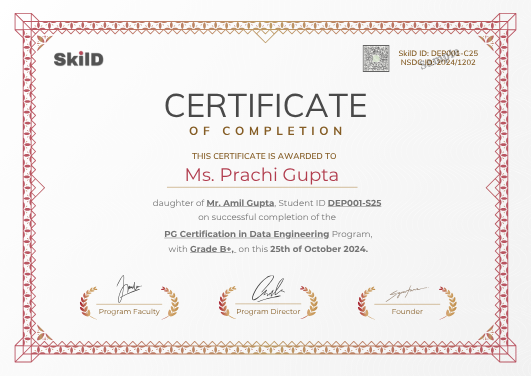
Awarded when your project is complete and every build passes its review, with a verification ID anyone can check.
Awarded by SkilD on completion, and checked at skild.co.in/verify. It names Five Hours Back, so an employer sees the work itself, with the ID to prove it.
One fee for the AI at Work course, everything included.
About ₹148 a live hour.
- All eight weeks, taught live
- Five Hours Back and three builds on the way
- Placement support
- Every session recorded
- The weekday doubt channel and the Saturday doubt clinic
- The certificate
Training a whole team? Plan it with us →
Why eight weeks, live, alongside work?
Plenty of ways to learn ChatGPT. Here is what each one usually gets you.
| The route | What it usually gets you | What 8 weeks here gets you |
|---|---|---|
| YouTube and free courses | Prompt tips in the wrong order, and nobody to ask when the answer is wrong. | A fixed order, and the faculty answering in the session. |
| A recorded course | Videos you mean to finish. | A live session every weekend, a deadline that keeps you moving, and placement support after. |
| A one-day workshop | A burst of ideas, and the same inbox on Monday. | Eight weekends, each one put to work on your own job the week after. |
From enrolment to your first Saturday.
- 1EnrolTwo short steps on this page
- 2Pay onceYour seat is held for this cohort
- 3Join the cohort groupOn WhatsApp, with your batch
- 4Setup callWith the helpline, before day one
- 5First live sessionOnline, with your faculty
10 AM IST. Bring one process from your week.
Seat confirmed. Welcome to the November cohort.10:02
- ✓ChatGPT
- ✓Claude
- ✓Microsoft Copilot
- ✓Power BI
The joining link for Saturday is pinned above.Fri 6:00 PM
- One price, everything includedevery live session and its replay, every project review, and placement support.
- Live means livea room of thirty, every question answered in the session.
- Dates that holdplan your months around us.
- A mentor who knows your namefirst reply within one working day.
- Miss a weekwatch the recording, then bring your questions to the Saturday doubt clinic.
- Everything you build is yourscode, projects, portfolio. For good.
Enrol in AI at Work.
Two short steps, then payment. About three minutes.
Details saved.
One more short step, then payment.
You are enrolled.
Your confirmation and the cohort WhatsApp link arrive within minutes. The helpline sets you up before day one.
AI at Work course: your questions, answered.
Do I need to know coding for the AI at Work course?
No. Zero code at any point. A clear email and a spreadsheet are all it assumes, and the helpline sets up every account in week one.
What will I be able to do after the AI at Work course?
Use ChatGPT, Claude, Gemini and Copilot as one system, build a team knowledge base that answers from your documents, analyse numbers with AI and check its arithmetic, build a dashboard, and plan one process with its baseline and its AI plan.
Which AI tools does the AI at Work course teach?
ChatGPT, Claude, Gemini and Microsoft Copilot; NotebookLM, Perplexity and deep-research modes; Otter.ai and Fireflies; Excel, Google Sheets, Power BI Desktop and Looker Studio; Gamma for decks; Teachable Machine; and Miro for process maps.
How does AI at Work teach AI tools to working professionals?
On your own work, with someone checking. Each week here is put to use on a task from your job and reviewed, with the faculty answering in the session and the doubt channel open on weekdays.
Which jobs will survive AI, and how does AI at Work help?
The ones where a person uses AI well: judges its answers, knows where it saves time and keeps the decisions. That pattern holds in every function, and it is what AI at Work builds.
Who can enrol in AI at Work?
Anyone who works with documents, meetings or spreadsheets and can follow a live class in English: managers, marketers, sales, HR, finance and operations, at any level, from any stream.
Is AI at Work an AI course for managers?
Yes, and for the people on their teams. Week 7 teaches the opportunity brief with an ROI estimate, so a rollout comes with numbers a manager can stand behind.
Is AI at Work a good AI course for HR professionals?
Yes, because it works on HR’s own tasks. Here the HR and Finance tab takes on the monthly MIS or the leave summary, and weeks 5 and 6 turn it into a checked dashboard.
Can I talk to someone before I enrol in AI at Work?
Yes. WhatsApp the helpline, or ask for a call back and a program advisor calls you with your 8-week plan.
How much time does the AI at Work course take?
Weekend mornings for eight weeks, plus a little practice at work.
What are the AI at Work course fees?
₹7,999 including GST, once. It covers all eight weeks taught live, Five Hours Back and three builds, placement support and the certificate.
Can I take the AI at Work course if my employer restricts AI tools?
Yes. Week 1 covers what stays out of a prompt and how to find your employer’s AI policy, and every build can run on your own accounts and sample data.
Do I get an AI at Work certificate?
Yes, with a verification ID an employer can check. It is awarded when your project is complete and every build passes its review.
Is there placement support after the AI at Work course?
Yes, in five steps: your resume and LinkedIn, a portfolio review, a mock interview, job alerts and introductions to hiring teams in the SkilD network, as roles open.
Do you run AI at Work for company teams?
Yes. It runs for a whole department, on its own work, with the same faculty. Plan a program for your team →
Eight weeks from now, the Friday report could take forty minutes.
Your AI system, a knowledge base the team trusts, numbers on a dashboard, a costed plan for one process, and placement support, for ₹7,999.
Want to look first? Download the syllabus or get a call back.
Data and AI openings on WhatsApp, and the hiring market twice a month.
The roles the companies our learners work at are hiring for. Read three issues of the Brief and you’ll know whether we’re your kind of school.
You’re on the list.
The first alert lands the next time our network is hiring, and the next Brief lands in your email.