

An assistant open all day, and using a tenth of what it can do?
AI-Assisted Development: an AI-assisted coding course on Cursor, Copilot and Claude Code. Ship more code and own every line, in 8 weeks, live.
For developers and anyone who already writes code: a working repository, one tool shipped in public with the log of every suggestion kept or refused, a timed AI-assisted coding round, placement support, and a certificate an employer can verify.
Taught live by industry experts from Mastercard and Paytm.
★ 4.7 from our pilot batch · 4,200+ learners trained by SkilD · learners at 39+ companies
Free · 90 minutes, live with our faculty · next date announced soon

Thirty developers on the same repository work, reviewing each other’s changes.
Ship One Tool, and three builds on the way to it.
Resume, portfolio review, a mock AI-assisted round, job alerts and introductions.
Named after your project, so an employer sees the work.
AI developer salary in India: up to ₹35 LPA in AI agent and automation roles.
Every company wants developers who ship faster with AI and still answer for every line. This course is the first rung; the pay comes from the roles it opens.
- ₹22–35 LPAAI agent and automation roles, mid-level
- ₹22 LPAAverage AI/ML Engineer pay, 2–5 years
- Up to ₹80 LPAAI/ML Engineer, top 10% at 8+ years
TeamLease Digital, 2025 (AI agent and automation roles, mid-level ₹22–35 LPA) · recrew.ai India AI/ML Engineer salary guide, 2026.
Who this AI coding course is for.
People who already write code, or have just started, and want to go faster while keeping the authorship.
Developer or software engineer→ Ships more, reviews better
The assistant is already open. Week 2 is where it starts answering for this repository, and week 5 is where it works in parallel, under review.
Final-year student or fresher→ Code a team will merge
Spec first, test first, small steps, review: the method that turns generated code into code someone merges, and the round hiring teams now run.
Data engineer or analyst who scripts→ Scripts that become tools
SQL and Python every day. Here, a notebook becomes a tested tool with a README, in a public repository.
Tech lead→ A review standard for the team
What to accept, what to refuse and what stays with people, written for the team’s own stack in week 6.
- Enough code to read and run a simple program, in any language
- Your Saturday afternoons for eight weeks, live
- A laptop that can run an editor, and a personal or open-source project
- A free GitHub account; the three assistants, set up with the helpline in week one
PG Program · AI Engineer: 34 weeks to the AI Engineer role.
Finish this course first and you start the program already shipping with an assistant. The program adds machine learning, LLMs and agentic AI, and an AI product shipped end to end, presented live to a hiring panel.
Cursor, Copilot and Claude Code, side by side, on a working repository.
The three assistants are taught on the same tasks, because teams use all three and the next job may use a different one. Ten tools in all, installed with the helpline in week one.
Cursor
An AI-first editor · inline edits · chat on the whole codebase · agent mode · project rules · MCP
Best at:multi-file edits watched as they happen
GitHub Copilot
Completions and chat inside VS Code or JetBrains · agent mode · code review on pull requests
Best at:staying inside the editor and the GitHub a team already uses
Claude Code
A terminal agent that reads the repository, plans, edits and runs the tests · CLAUDE.md · subagents · hooks · MCP
Best at:larger changes planned first, and sessions that run in parallel
Week 1 runs one task in all three. Ship One Tool is built with whichever one fits best.
- Nothing to buy. A laptop that can run an editor
- VS Code, Cursor and Git installed, with the helpline
- Each assistant on its free tier or trial, and what a paid plan adds
- A free GitHub account, where the tool lives
Stuck on setup? WhatsApp the helpline and someone walks through it with you. Every commit is yours to keep.
Plan it. Spec it. Test it. Ship it.
The full AI-assisted development syllabus: eight Saturdays in four parts, and something committed at the end of each one.
Setup and contextweeks 1–2 · 6 hrsYou leave able toRun all three assistants on a working repository, with context that makes the answers fit it.
- W1AI coding assistants in the IDEInline, chat and terminal agent · Cursor, Copilot and Claude Code installed · model choice · one task in all three · precise task specification: file, function and acceptance criteria · diff review · Git-based rollback3 hrs
- W2Context engineeringWhat the assistant can see · instruction files: AGENTS.md, CLAUDE.md and Cursor rules · context selection · MCP servers for a database, a ticket tracker and the docs · reusable skills and commands · context-window management: compaction and session handoff3 hrs
Code you would signweeks 3–4 · 6 hrsYou leave able toPlan a change, test it first, and refactor someone else’s code, safely.
- W3Spec-driven and test-driven developmentPlan mode before the edit · a spec with inputs, outputs and edge cases · the failing test first · one behaviour per request · rejecting a suggestion, with the rationale · commits and PR descriptions that match the changeBuild: a spec-first feature in an existing codebase3 hrs
- W4Working in legacy codebasesCodebase onboarding · entry points and data flow · root-cause analysis from stack traces · characterisation tests before a refactor · multi-file renames · a dependency upgrade · a legacy module modernised in small commitsBuild: a safe refactor under characterisation tests3 hrs
Speed with safetyweeks 5–7 · 9 hrsYou leave able toRun agents in parallel, review what they write, and catch code that looks right and is wrong.
- W5Parallel agents and code reviewSubagents for search and tests · parallel sessions on git worktrees · hooks that run the checks · CI on GitHub Actions · AI review on a pull request · spec-based test generation, and mutation testing to expose ineffective tests3 hrs
- W6Failure modes and secure AI-assisted developmentHallucinated APIs · logic errors that pass shallow tests · deprecated patterns · injection vulnerabilities and missing authorization checks · secrets management across prompts, commits and logs · licence compliance · code ownership and accountability policyBuild: a planted-defect review report3 hrs
- W7Building agentic developer workflowsA small MCP server for a tool the team uses · custom commands and skills for the repeated work · hooks that stop a bad commit · the assistant run headless in CI · agent permission policies · a time and cost budget per task3 hrs
Your tool and the hiring roundweek 8 · 3 hrsYou leave able toShip a tool in public, and walk through AI-assisted code in a timed round.
- W8Capstone: Ship One Tool, and the AI-assisted coding assessmentOne tool from the day job, built test-first with the chosen assistant · the prompt-and-diff log · a README that discloses AI-generated code · presented to the cohort · a timed AI-assisted coding assessment, with think-aloudBuild: Ship One Tool, in a public repository3 hrs
Ship One Tool · AI-Assisted Development
A working tool with tests, a README and the prompt-and-diff log, and resume lines to explain in any interview.
The detailed AI-Assisted Development syllabus and the timetable, in one PDF.
- Every topic, week by week
- The timetable, with dates
- All ten tools, by part and by assistant
- The setup guide for week one
Download it now. The helpline is on WhatsApp if a question comes up.
Your syllabus is ready.
Questions? The helpline answers on WhatsApp.
Taught live by industry experts who ship and review production code.
They answer in the cohort chat between sessions, and review the work you hand in.




Get your 8-week plan, mapped onto your own repository.
Leave your number and a program advisor calls within one working day with a plan built around the code you write: the assistant to start with, and the tool worth shipping. Or WhatsApp the helpline now.
Your plan is on its way.
A program advisor calls within one working day to walk through it.
Three things that make eight Saturdays work.
Hands-on, from week one
Every Saturday ends in a commit to your repository, reviewed by the faculty.
Three assistants, side by side
Cursor, GitHub Copilot and Claude Code on the same tasks, with seven more tools around them.
Built around a full-time job
Saturday afternoons, and every class recorded and up within 24 hours.
What a Saturday looks like, and the help around it.
Everyone moves through the same week on the same deadline, on the same kind of repository work.
- 01The brief, firstWhat you’ll build this week, and what done looks like. Before the session, not after.
- 02Build it with the facultyOn screen with the faculty, chat open, your question answered on the call.
- 03Finish it in the repositoryStarted in the session, finished by the deadline, committed and pushed.
- 04Reviewed, every weekYour pull request read by the expert who set it, so you know where you stand.
- 05Bring what brokeAsk in the cohort chat, or bring it to the next session.
One project an interviewer can open: Ship One Tool, a tested tool in a public repository with its prompt-and-diff log.
It lives on GitHub, and it is finished when a stranger can clone it, run the tests and read what the assistant wrote.
Ship One Tool: a small tool from the day job, built with an AI assistant and shipped in public.
The spec comes before the editor opens. The tool is built test-first with the chosen assistant, published with a README and the log of every suggestion kept or refused, then presented, including one thing the assistant got wrong.
- How it works
- From week 2 the assistant knows the repository. From week 3 every change starts as a spec and a failing test. From week 5 the checks run on every push, and from week 7 your own agent workflow runs them.
- Where it is used
- The same shape builds an internal command-line tool, a data-cleaning script turned into a package, a small API, and the admin page a team keeps asking for.
- What it proves
- That you can ship faster with an assistant and still answer for every line. The log shows the judgement was yours.
- What it does
- Turns a messy CSV export into a clean weekly report.
- Tech stack
- CursorClaude CodePythonpytestGitHub Actions
- Key challenge
- Hallucinated APIs: every suggestion checked before it is kept.

Three builds on the way
Each one becomes a piece of Ship One Tool.
Spec-First Feature in an Existing Codebase
A feature added to an open-source or starter repository, specified first and built against a failing test, with the prompt-and-diff history beside it.
Done when: the new test passes and every old one still does.
Proves the ability to add to someone else’s code, test first.
Safe Refactor Under Characterisation Tests
A tangled module refactored across several files, with tests written first to pin down what it does today.
Done when: the same tests pass before and after the refactor.
Proves the ability to change how code is built without changing what it does.
Planted-Defect Review Report
Assistant-written code with a planted logic bug and a security hole, both found, explained and fixed, plus a review checklist for the stack.
Done when: both defects are found and the checklist would have caught them.
Proves the ability to catch code that looks right and is wrong.
The faculty who teach it review every project.
Placement support: five steps from the course to your next developer role.
Ship One Tool is the raw material. These five steps put your project in front of hiring teams, and run the AI-assisted round before a hiring team does.
- 1Week 8Your resume and LinkedInRewritten around Ship One Tool and reviewed line by line.
- 2Week 8Your portfolio reviewThe repository checked against what an interviewer opens first: the README, the tests and the log.
- 3After week 8A mock AI-assisted coding roundA timed round with an industry expert, assistant switched on, thinking aloud, recorded and reviewed.
- 4From week 8Job alertsDeveloper openings on WhatsApp, as they open.
- 5From week 8IntroductionsTo hiring teams in the SkilD network, as roles open.
Check your resume against these roles first → · Going for the AI Engineer role? See the PG program →
Our learners work at 39+ companies.
Where people who learned with SkilD work now.


 amazon
 Swiggy
 Twitter
 ByteDance
 PayPal


 Flipkart


 ATLASSIAN
Training a team? 12+ organizations bring us in to train their own people, on their own work. Plan a program for your team →
Hiring teams now run AI-assisted coding rounds. Walk into yours ready.
The assistant is allowed. The judgement is what gets scored.
A growing number of hiring teams run coding rounds with the AI assistant switched on, and watch what the candidate does with its output: the plan, the tests, the suggestion refused and why. Week 8 runs a timed practice round, and placement step three repeats it with an industry expert.
From faster code to code they own.

The coding round in my switch let us use Copilot. I planned first, wrote the test and refused one suggestion out loud. Then they asked about the log from my project.

Week two was the change. One instruction file, and the assistant stopped suggesting code that ignored how our repository works.

I came from analysis and scripts in notebooks. Ship One Tool turned one of them into a tested tool on GitHub, and I joined the AI Engineer program after.
One AI-assisted development certificate an employer can verify by its ID.
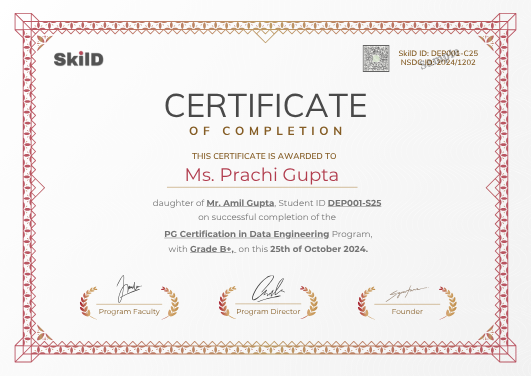
Awarded when your project is complete and every build passes its review, with a verification ID anyone can check.
Awarded by SkilD on completion, and checked at skild.co.in/verify. It names Ship One Tool, so an employer sees the work itself, with the ID to prove it.
One fee for the AI coding course, everything included.
About ₹375 a live hour.
- All eight Saturdays, taught live
- Ship One Tool and three builds on the way
- Placement support, with a mock AI-assisted round
- Every session recorded
- The weekday doubt channel and a weekly doubt clinic
- The certificate
Training a whole team? Plan it with us →
Why eight Saturdays, live?
Plenty of ways to learn an AI coding assistant. Here is what each one usually gets you.
| The route | What it usually gets you | What 8 weeks here gets you |
|---|---|---|
| YouTube and the tool makers’ tutorials | One tool’s features at a time, and nobody reviewing the code. | Three assistants on the same task, and the faculty reviewing what you ship. |
| A recorded course | Videos you mean to finish, on someone else’s code. | A working repository, a deadline each week, and placement support after. |
| Coding with the assistant alone | Speed, and guesswork about what it got wrong. | A method: plan, spec, test, review, and a planted-defect report that proves it. |
From enrolment to your first Saturday afternoon.
- 1EnrolTwo short steps on this page
- 2Pay onceYour seat is held for this cohort
- 3Join the cohort groupOn WhatsApp, with your batch
- 4Setup callWith the helpline, before day one
- 5First live sessionOnline, with your faculty
2 PM to 5 PM IST. Bring a repository you work in.
Seat confirmed. Welcome to the November cohort.10:02
- ✓Cursor
- ✓VS Code
- ✓Git
- ✓GitHub
The joining link for Saturday is pinned above.Fri 6:00 PM
- One price, everything includedevery live session and its replay, every project review, and placement support.
- Live means livea room of thirty, every question answered in the session.
- Dates that holdplan your months around us.
- A mentor who knows your namefirst reply within one working day.
- Miss a weekwatch the recording, then bring your questions to the Saturday doubt clinic.
- Everything you build is yourscode, projects, portfolio. For good.
Enrol in AI-Assisted Development.
Two short steps, then payment. About three minutes.
Details saved.
One more short step, then payment.
You are enrolled.
Your confirmation and the cohort WhatsApp link arrive within minutes. The helpline sets you up before day one.
AI-assisted development course: your questions, answered.
How much coding do I need for this AI-assisted development course?
Enough to read and run a simple program in any language. Starting from a blank screen? AI Engineer Fundamentals or Data Engineering Fundamentals begin there.
Which AI coding tools does the course teach?
Cursor, GitHub Copilot and Claude Code, side by side, with VS Code, Git, GitHub, GitHub Actions, pytest or Jest, and MCP servers around them. Ten tools in all.
What is the difference between AI-assisted coding and vibe coding?
Vibe coding accepts what the assistant writes and checks whether it runs. AI-assisted coding plans first, tests first, reads every diff and refuses what does not fit, so the code can be merged and maintained. This course teaches the second.
Does this AI coding course show whether Cursor is worth paying for?
It depends on the code being written, which is why week 1 runs one task in Cursor, Copilot and Claude Code on their free tiers or trials first. The course ends with a clear view of which one earns a paid plan.
Will AI-assisted development keep my own coding sharp?
Yes. Week 3 keeps the spec and the tests in your hands, and week 6 puts in writing which parts of the work stay yours, so the assistant adds speed while your judgement keeps growing.
Who can take this AI coding course?
Developers and software engineers, final-year students and freshers with coding basics, tech leads, and data engineers or analysts who script. Enough code to read and run a simple program is the whole bar.
Can I use my employer’s codebase in the AI coding course?
Use a project your employer allows. Week 2 covers what stays out of context, and week 6 covers licensing and secrets. An open-source repository or a personal project works just as well.
Can I talk to someone before I enrol in the AI coding course?
Yes. WhatsApp the helpline, or ask for a call back and a program advisor calls you with your 8-week plan.
How much time does the AI-assisted development course take?
Saturday afternoons for eight weeks, plus a little practice in the repository.
What are the AI coding course fees?
₹8,999 including GST, once. It covers all eight Saturdays taught live, Ship One Tool and three builds, placement support in five steps with a mock AI-assisted round, replays and the certificate.
Do I need paid Cursor, Copilot or Claude Code plans for this AI coding course?
Week 1 sets each one up on its free tier or trial and shows what a paid plan adds, so any paid plan you choose comes from experience.
Do I get a certificate for AI-assisted development?
Yes, a SkilD certificate with a verification ID an employer can check, awarded when your project runs and every build passes its review.
What is an AI-assisted coding round?
A hiring round where the assistant is switched on and the panel watches how the candidate uses it: the plan set, the tests asked for, the suggestion refused and why. Week 8 runs a timed practice round, and placement step three repeats it with an industry expert.
Do you run AI-assisted development training for engineering teams?
Yes. It runs for a whole engineering team, on its own repositories, with the same faculty. Plan a program for your team →
Go faster. Stay the author.
Three assistants on a working repository, a tool shipped in public with its log, an AI-assisted round already practised, and placement support, for ₹8,999.
Want to look first? Download the syllabus or get a call back.
Data and AI openings on WhatsApp, and the hiring market twice a month.
The roles the companies our learners work at are hiring for. Read three issues of the Brief and you’ll know whether we’re your kind of school.
You’re on the list.
The first alert lands the next time our network is hiring, and the next Brief lands in your email.